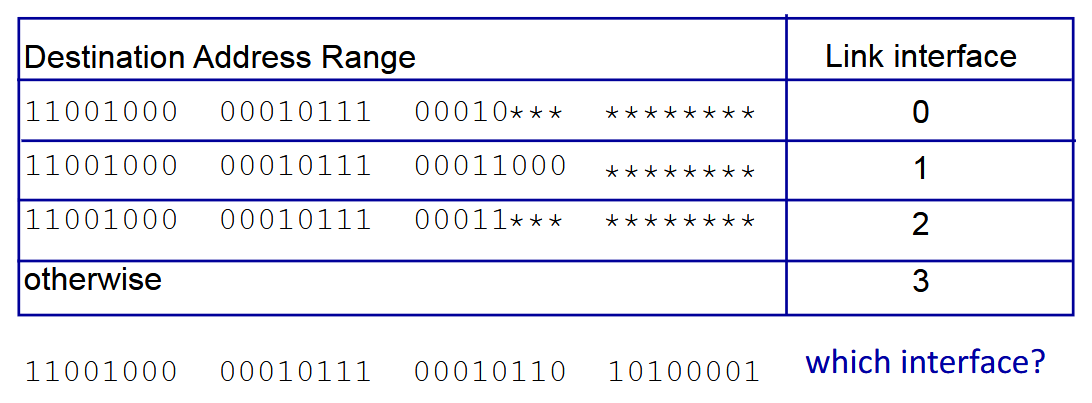
In computer networking, destination-based forwarding is done by routers to determine, given a packet at an input port, which output port to forward the packet to. This is done by analysing the bit composition of the destination IP address, i.e., by examining the IP header.
Routing table
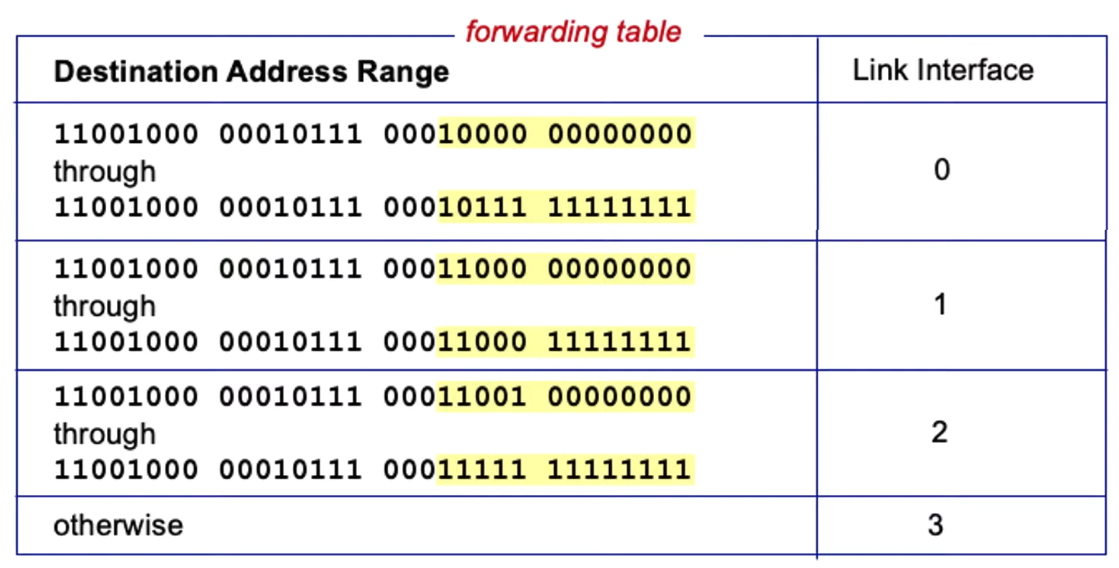
One method is via a {forwarding, routing, flow} table, where a specific bit range (often the LSBs) determines what link interface the destination address is assigned to (much like virtual memory translation in operating systems).
 Each row in the routing table contains:
- Destination IP address
- IP address of next-hop router
- Physical address — the MAC (Media Access Control) address of the next hop in the route. It contains the hardware address of the NIC that the packet should be sent to next.
- Statistics information — mainly metrics and usage data collected about each route, including cost, interface (what type), maximum transmission unit, hop count, and usage statistics (how many packets have used the route, error count, average latency). This helps with route selection.
- Flags
- H=1 (0) indicates the route is to a host (network)
- G=1 (0) indicates the route is to a router (directly connected destination)
Hosts and routers maintain a routing table to determine where to send their packets.
- In the originating host, it consults its routing table.
- If the destination host is in the same network, then the packet is sent directly with the link layer technology.
- Otherwise, it is sent indirectly, often via a default router.
- In the router, it examines the IP destination address.
- If the destination isn’t its own, the routing table is consulted to determine the next hop and associated network interface. Then, it forwards the packet.
When a router receives a packet, it performs a search in this order:
- Complete destination address match - The router first looks for an exact match for the full IP address in its routing table. If found, it forwards the packet according to the next-hop information and Gateway (G) flag settings.
- Destination network ID match - If no exact host match is found, the router looks for the network portion of the address. If a matching network is found, it forwards based on next-hop info and G flag.
- Default router entry - If no specific matches are found, the router checks for a default route (often shown as 0.0.0.0/0). If present, it sends the packet to the default next-hop.
- Declare packet undeliverable - If no matches exist at all (including no default route), the router declares the packet undeliverable and sends an ICMP “host unreachable error” message back to the source.
Longest prefix matching
Another approach is using longest prefix matching. We instead use the longest address prefix that matches the destination address. This is a most specific match, where any destination address has to match the bits we care about (the asterisks are don’t cares). In the example below, all the leftmost bits match the ones in the 0th prefix.