In Windows, the Plug and Play (PnP) device tree is used to organise hardware.
- Nodes on the tree represent hardware devices, buses, or an individual function on a composite device. They can also represent software components (with no associated physical device).
- Nodes are called device nodes. The root node is called the root device node.
- By convention, the root is at the bottom of the tree.
- Edges represent a parent/child relationship.
- For example, a single PCI bus may connect to many different hardware components.
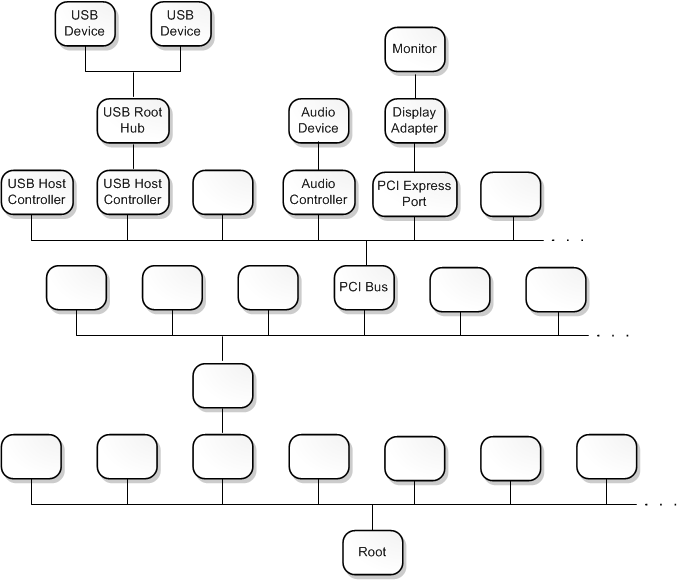
Tree construction
A device object is an instance of a DEVICE_OBJECT structure. Each device node in the PnP tree has an ordered list of device objects, and each device object is associated with a driver. We call the ordered list of the (device, driver) tuples the device stack for the node. The first device object to be created in the device stack is at the bottom. The last device is at the top.
The device stack must have one function driver, which is the main driver for the device stack and responsible for handling read/write/device control requests. Filter drivers play auxiliary roles in processing read/write/control requests.
During start-up, the PnP manager will ask each driver to enumerate the devices that are connected to the bus/node. The driver will create a device object for each device connected to the bus/node, each a physical device object (PDO). This creates children on the device tree. Then, the PnP manager will associate a device node with each PDO. It will look for which drivers need to be part of the device stack for the node.
Resources
- Device nodes and device stacks
DEVICE_OBJECTstructure inwdm.h